
|
iOS Device Feature Control |
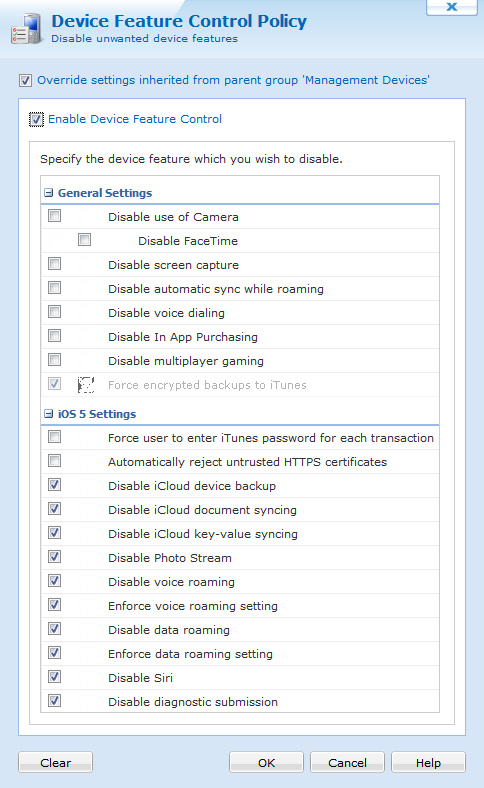
For security-conscious organizations and environments where privacy and information security concerns require controlling the unauthorized transfer of mobile data out of the mobile devices, MobiControl provides various on-device feature controls including the capability to block various device communications, similar to firewall functionality. MobiControl's device features control policy allows IT administrators to selectively disable device features. Applying the policy at the individual or group level allows custom profiles for different users and locations in an organization. The ability to disable or enable Bluetooth and infrared ports allows controlling whether end users can beam business cards, applications or documents to one another.
To enable device feature control for a device or group of devices, select Device Feature Control Policy from the MobiControl Security Center. (Please see the iOS Device Security page.)
The following features can be enabled or disabled using the device feature control policy:
| Option | Description |
|---|---|
| Disable use of Camera | Prevents the user from using the device camera. |
| Disable FaceTime | Prevents the user from utilizing FaceTime. |
| Disable screen capture | Prevents the user from taking a screen capture using the hardware buttons. |
| Disable automatic sync while roaming | Prevents the users mail accounts from synchronizing while the device is roaming. |
| Disable voice dialing | Prevents the user from using the voice dialing feature. |
| Disable In App Purchasing | Prevents the user from purchasing additional features of an application or an additional app from within an app. |
| Disable multiplayer gaming | Prevents the user from engaging in multiplayer gaming. |
| Force encrypted backups to iTunes | Automatically backs up the users data in iTunes. |
iOS 5 only options
| Option | Description |
|---|---|
| Force user to enter iTunes password for each transaction | Forces the user to enter their iTunes password for each iTunes transaction. |
| Automatically reject untrusted HTTPS certificates | Automatically reject untrusted HTTPS certificates. |
| Disable iCloud device backup | Prevents the user from backing up the device with iCloud. |
| Disable iCloud document syncing | Disables automatic iCloud document syncing. |
| Disable iCloud key-values syncing | Disables automatic iCloud key-value syncing. |
| Disable Photo Stream | Prevents the users from using the photo streaming function. |
| Disable voice roaming | Disables voice calls while the device is roaming. |
| Disable voice roaming setting | Prevents the user from changing the setting for voice calls while roaming. |
| Disable data roaming | Disables data while the device is roaming. |
| Disable data roaming setting | Prevents the user from changing the setting for data while roaming. |
| Enforce data roaming setting | Forces the data roaming setting to enabled. |
| Disable Siri | Prevents the user from using Siri. |
| Disable diagnostic submission | Prevents the user from submitting diagnostic information. |